
Once you understand how to use filter function in Excel, it becomes hard to go back to old formulas or manual filters. I still remember opening a sheet and realizing that the data could spill automatically, adjust itself, and respond to changes without rewriting formulas. That is where dynamic arrays and dynamic data really start to matter.
This article is a deep but practical look at how to use filter function in excel, written for people who want clarity rather than fancy tricks. We will walk through syntax and example setups, real use cases, and the kind of mistakes that happen when dealing with an excel empty cell or a messy range of data.
What the FILTER Function Really Does
At its core, the FILTER function returns only the rows or columns that meet your conditions. You define a range of cells, apply logic, and Excel sends back return values that match. This is not like old school sorting data where results overwrite existing rows. FILTER works with dynamic arrays, meaning the output expands and contracts automatically based on dynamic data.
Understanding how to use filter function in excel starts with this idea. You are not copying data. You are asking Excel to show you only what matters from a range of data.


Understanding Dynamic Arrays Before Anything Else
Before jumping too far, dynamic arrays deserve attention. Dynamic arrays allow a formula to return multiple return values into a range of cells. The FILTER function depends fully on dynamic arrays. When the source range of data changes, the filtered result updates instantly.
This is why how to use filter function in excel is often discussed together with dynamic arrays. Without understanding dynamic arrays, the behavior of spilled results can feel confusing. A simple change in dynamic data can push results down or across, and that is expected behavior.
FILTER Function Syntax Explained Simply
The basic syntax and example look like this in plain language.
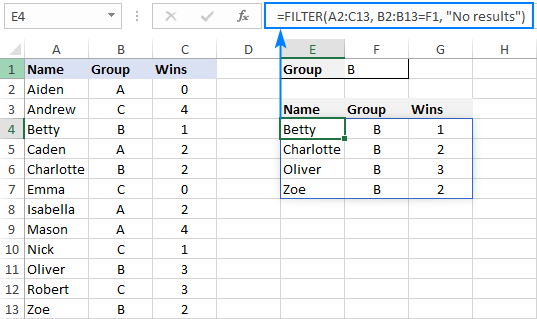
FILTER(range, include, if_empty)
The range is the range of cells you want to filter. The include part is a logical test applied to that range of data. The if_empty part handles what happens when nothing matches, which is important when dealing with an excel empty cell situation.This syntax and example helps clarify the structure.
When learning how to use filter function in excel, always test the if_empty argument. Many errors happen because people forget what happens when return values do not exist. Following the correct syntax and example prevents these errors.
A Basic Example Using a Simple Range of Data
Imagine a range of data with employee names and departments. You want only the sales team. The FILTER function takes the range of cells containing names and checks the department column. Only rows where the condition is true are returned.
This simple syntax and example shows why how to use filter function in excel feels so natural. You are describing what you want, not manually hiding rows or sorting data by hand.
Filtering Numbers with Conditions
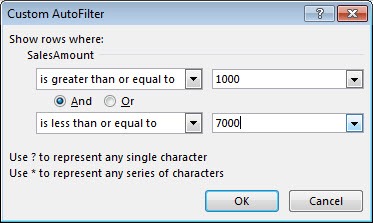
Filtering numeric values is where the function starts to shine. You can filter sales greater than a certain value, or expenses below a threshold. The range of data remains intact, while the output updates.
In these scenarios, how to use filter function in excel saves time because dynamic data changes constantly. New numbers enter the sheet, and the return values adapt automatically without adjusting the formula.
Working with Multiple Conditions
Multiple conditions are possible by combining logical expressions. You can filter by region and product at the same time. This works because dynamic arrays can handle combined logic.
When learning how to use filter function in excel, this is often the moment people realize they no longer need complex helper columns. The range of cells stays clean, and the logic lives inside the formula.
Handling Excel Empty Cell Situations
An excel empty cell can cause confusion if not handled properly. If your condition refers to blank values, FILTER might return nothing. That is where the if_empty argument helps.
This is an underrated part of how to use filter function in excel. A simple message like No results found makes the output easier to understand for other users reading the sheet later.
Filtering Text Values the Right Way
Text filtering works best when data is consistent. Extra spaces or mismatched cases can break logic. The FILTER function itself does not clean data. It only filters the range of data you give it.
So while practicing how to use filter function in excel, it helps to prepare the range of cells first. Clean text leads to reliable return values.

FILTER Function and Sorting Data Together
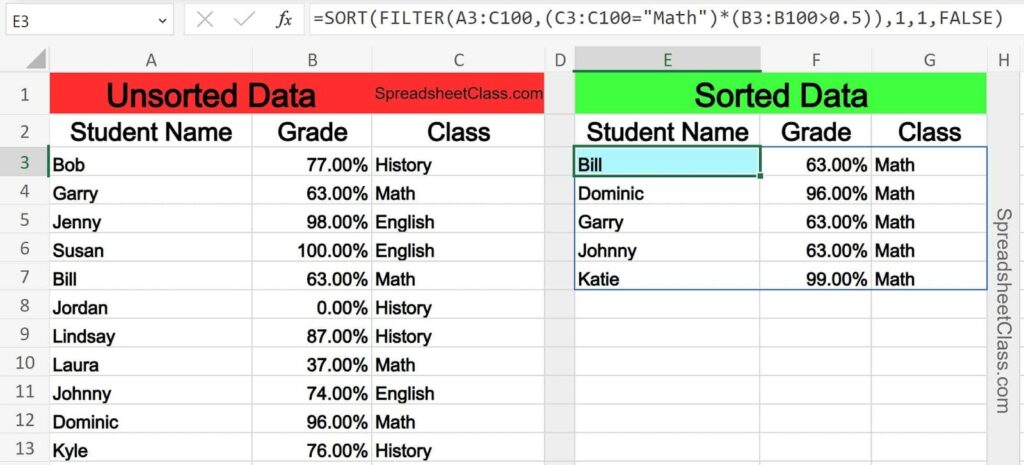
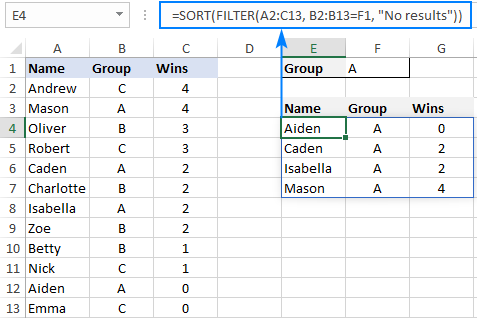
FILTER does not sort data by default. It only filters. However, you can combine FILTER with sorting data functions like SORT. This is where dynamic arrays feel powerful.
Understanding how to use filter function in excel includes knowing when to layer functions. FILTER pulls the rows, SORT arranges them, and the final output updates with dynamic data changes. By performing sorting data alongside your filter, you ensure your list remains organized.
Real World Use Case in Reporting
In reports, people often need views rather than raw data. FILTER creates these views. A single range of data can feed multiple filtered outputs.
This use case explains why how to use filter function in excel matters in dashboards. Instead of copying sheets, you rely on dynamic arrays and return values that adjust instantly.
Using FILTER with Dates
Dates behave like numbers in Excel, which makes filtering easier. You can filter by month, year, or a specific date range.
While learning how to use filter function in excel, date filtering feels natural once you understand the range of cells involved. The dynamic data updates when new dates are added.
Common Mistakes People Make
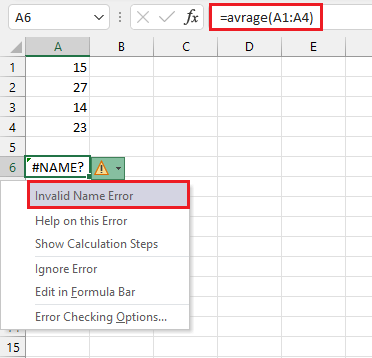
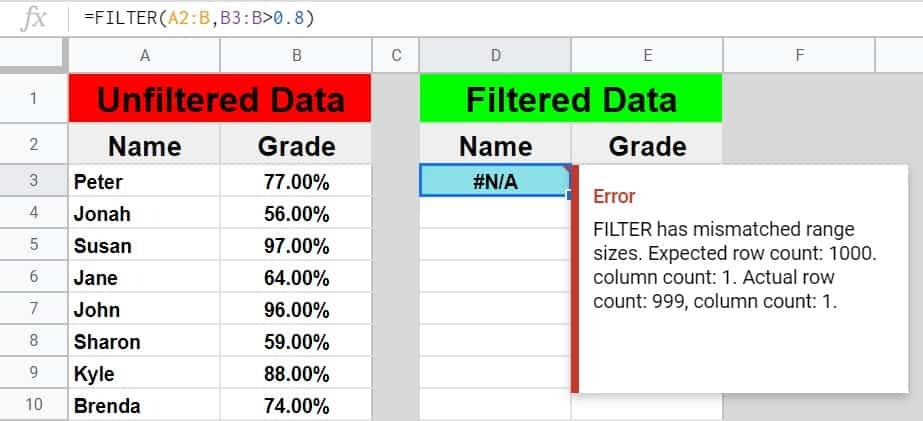
One common mistake is selecting mismatched ranges. The include logic must align with the range of data. Another issue is forgetting about excel empty cell behavior.
Most problems disappear when people slow down and rethink how to use filter function in excel logically instead of rushing the formula.
Performance and Large Data Sets
FILTER performs well even with large dynamic data sets. Because it works on dynamic arrays, Excel handles recalculation efficiently.
For anyone working with big reports, learning how to use filter function in excel reduces the need for repeated sorting data actions and manual updates.
FILTER Function Versus Old AutoFilter
AutoFilter hides rows and is often used for sorting data. FILTER returns values elsewhere. This difference matters in collaboration.
Once you understand how to use filter function in excel, you will notice fewer accidental edits to the original range of data, better options for sorting data, and cleaner workflows.
Combining FILTER with Other Functions
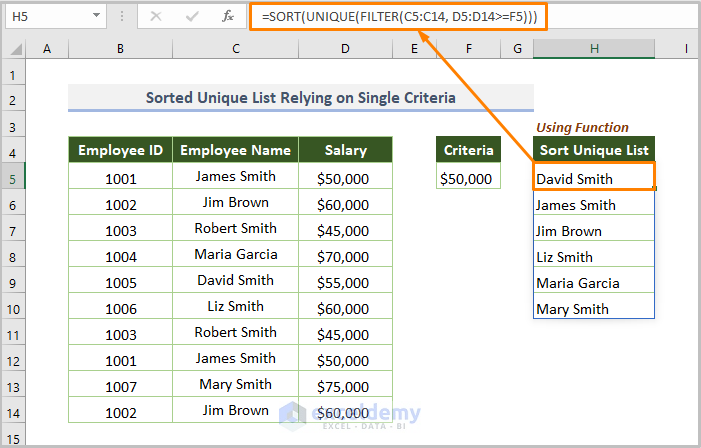
FILTER works well with functions like UNIQUE and SORT, keeping your results live and allowing them to update automatically. You no longer have to lock your ranges because everything grows or shrinks as your data changes. This is where the filter function in Excel truly begins to shine. For many users, this is also the point where old array formulas slowly fade away
Conclusion
Excel is changing, slowly but surely, and it is moving away from those stiff, static grids. Learning how to use the filter function in Excel and understanding its syntax and example is honestly one of the best ways you can spend your time if you deal with data often. It makes your work easier and your sheets stronger when things change.
Try not to depend only on the manual filter button anymore. You might use it for shop stock, school marks, simple lists, anything really. Just keep an eye on the #SPILL error and try to keep your ranges neat and steady. If you follow the correct syntax and example, you can avoid many common layout issues.
Frequently Asked Questions
Can I use the filter function across different sheets? Yes you absolutely can. You just need to reference the sheet name in your range of cells. This is a great way to keep your raw data on one tab and your clean filtered reports on another. It is a very common way to use filter function in excel for better organization.
What happens if my data changes size? If you use an Excel Table instead of a regular range of data your formula will automatically adjust. This is the best way how to use filter function in excel because you never have to update the range of cells in your formula manually.
Why am I getting a spill error? A spill error usually means there is something in the way of your dynamic arrays. Check the cells below and to the right of your formula. If there is even a single hidden space or an excel empty cell that has some formatting it might block the return values.
Can I filter for partial matches? Yes but you have to use the SEARCH or FIND function inside the FILTER function. It is a bit more advanced but it is a powerful way how to use filter function in excel when you do not know the exact spelling of what you are looking for.
Is it possible to filter by row instead of by column? The FILTER function is mostly designed for rows but you can use it with the TRANSPOSE function if you need to flip your dynamic data around. Understanding the syntax and example for vertical data is usually enough for most people though.
How do I handle an excel empty cell in my results? If you do not want zeros appearing where there is an excel empty cell in your source you can wrap the whole thing in an IF statement or use a custom number format to hide zeros. This is a common tweak when you want your return values to look clean.Can I sort and filter at the same time? Yes as mentioned earlier sorting data is easy when you nest functions. You just put the FILTER formula inside the SORT formula. This is the most efficient way how to use filter function in excel for creating ranked lists.